
Run 21 manufacturing domains on one data model,
and search that shows the records behind every answer
MES, QMS, WMS, APS, maintenance and more: 21 manufacturing domains run on one data model on Azure. Start small, without a large implementation project and without replacing the systems you run today.
Request a guided trial and we will set up a trial workspace, load a sample of your data, and review the results with you.
- Runs on Microsoft Azure
- Korean Patent No. 10-3003470
When production, quality and equipment data sit in separate systems, one question takes several people to answer
Data sits in separate systems
Work orders are in the MES, inspection results in spreadsheets, equipment history somewhere else. Finding the cause of one defect means exporting files and matching them by hand.
New systems take long and cost a lot
Even a single MES rollout becomes a long project, from requirements through development and installation. The budget goes out before any results come in.
AI answers are hard to trust
General-purpose AI does not know your records and fills the gaps with plausible guesses. If you cannot see which record an answer came from, it is of no use on the shop floor.
VEXPLOR Logic Studio brings 21 manufacturing domains onto one data model
Production, quality, inventory and maintenance data share one model, so they can be searched together instead of being exported between separate systems. Start with the domain you need and extend on the same data.
Standard opens 5 of the 21 domains
The other domains open on Professional. Product carbon calculation and supplier carbon data are add-on modules, separate from the ESG domain.
Production
- MESManufacturing executionStandard
- APSProduction planningProfessional
- Digital twinProfessional
Quality
- QMSQuality managementStandard
- SPCStatistical process controlProfessional
- LIMSLaboratory informationProfessional
- HACCPFood safetyProfessional
- cGMPPharma and cosmetics qualityProfessional
Equipment and energy
- EAMEnterprise asset managementProfessional
- MROMaintenance suppliesProfessional
- FEMSFactory energyProfessional
Logistics and supply chain
- WMSWarehouse managementStandard
- SCMSupply chainProfessional
- TMSTransportationProfessional
Product and customer
- PLMProduct lifecycleProfessional
- CRMCustomer relationshipsProfessional
Management and support
- ERPEnterprise resourcesStandard
- HRHuman resourcesProfessional
- GroupwareStandard
- SecurityProfessional
- ESGESG indicatorsProfessional
Logic Studio builds screens from definitions, not code
Every business screen reads and saves records through the same single server handler.
Business data will be read and changed not only by people but by AI. The AI connection goes through the same access checks, tenant separation and sensitive-field rules as people, and only the fields your administrators allow go out.
Business screens grow without a development project
More screens, the same access checks, tenant separation and masking
Business rules run in the same transaction as the save
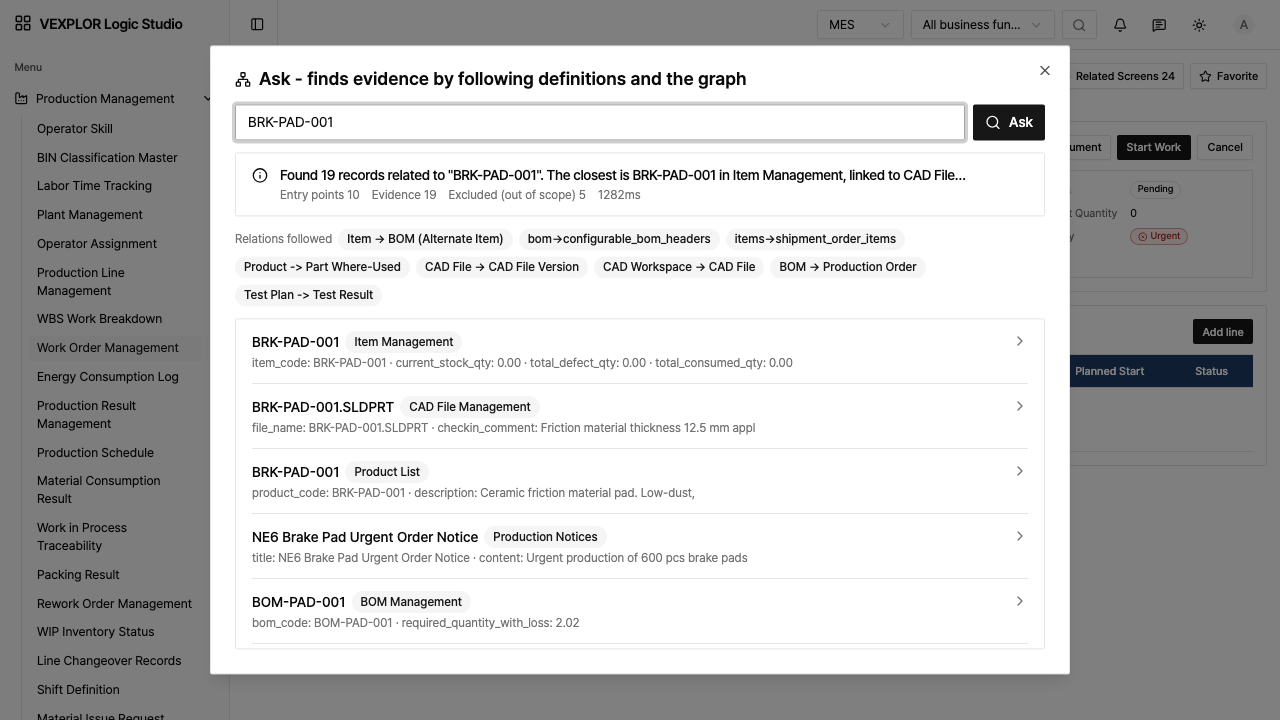
Search finds your records and shows the records behind every answer
A question is matched against a knowledge graph and a text index of your records, and the two result lists are merged into one ranking. Each answer lists the records it came from, with sensitive fields masked; select one to open its original screen.
No evidence, no answer
When nothing matches, the service gives no answer and says so. This deployment does not call a language model; answers are assembled from the records that matched.
Indexed when a record is saved
When a record is created, edited or deleted from a screen's main form, its search entry, and for core business records its graph entry, is updated in the same database transaction. Line items, status changes and records written by business rules are not indexed at once in this release.
Related patent
Includes storing each transaction in the relational database and the knowledge graph together
Korean Patent No. 10-3003470Your company's AI assistant reads Logic Studio records read-only, with the evidence behind each answer
Connect an AI client that supports MCP (Model Context Protocol), such as Claude, and it can look up screens, records and the knowledge graph read-only, receiving the evidence records with each answer. It never sees more than the account permissions of the person who requested the token.
Read-only
Only five lookup tools are exposed: evidence search, screen list, screen description, record lookup and relation lookup. No tool writes or deletes records.
Two-person approval and internal approval document number
A token is approved only by a different admin from the one who requested it, with the customer's internal approval document number recorded. Tokens expire within 90 days at most and are stored only as hashes.
Your admin switches it on, every call is logged
Only the customer's owners and admins can turn the connection on or off; WACE operators cannot. Every call is kept in an access log (argument hash, result and row count, not the content), which admins can download as CSV.
Person-level data stays out
Tables where one row is one person, such as the employee roster, attendance, leave, payroll and reviews, are excluded from MCP lookups entirely, and personal-data fields are not sent.
MCP connection is a paid add-on module sold separately from the plans. Contact us for pricing.
Try it on a sample of your data without replacing the systems you run today
Nothing has to be replaced on day one. We set up a separate trial workspace and load a sample of your data, so you can try the screens and search first. Any list screen can be exported as CSV, up to 5,000 rows per file.
Fit the screens to your shop floor without code
Account owners and admins rename fields, hide the ones you do not use, change their order and set sorting per screen. Changes are saved per company, and a screen can be reset to its original definition.
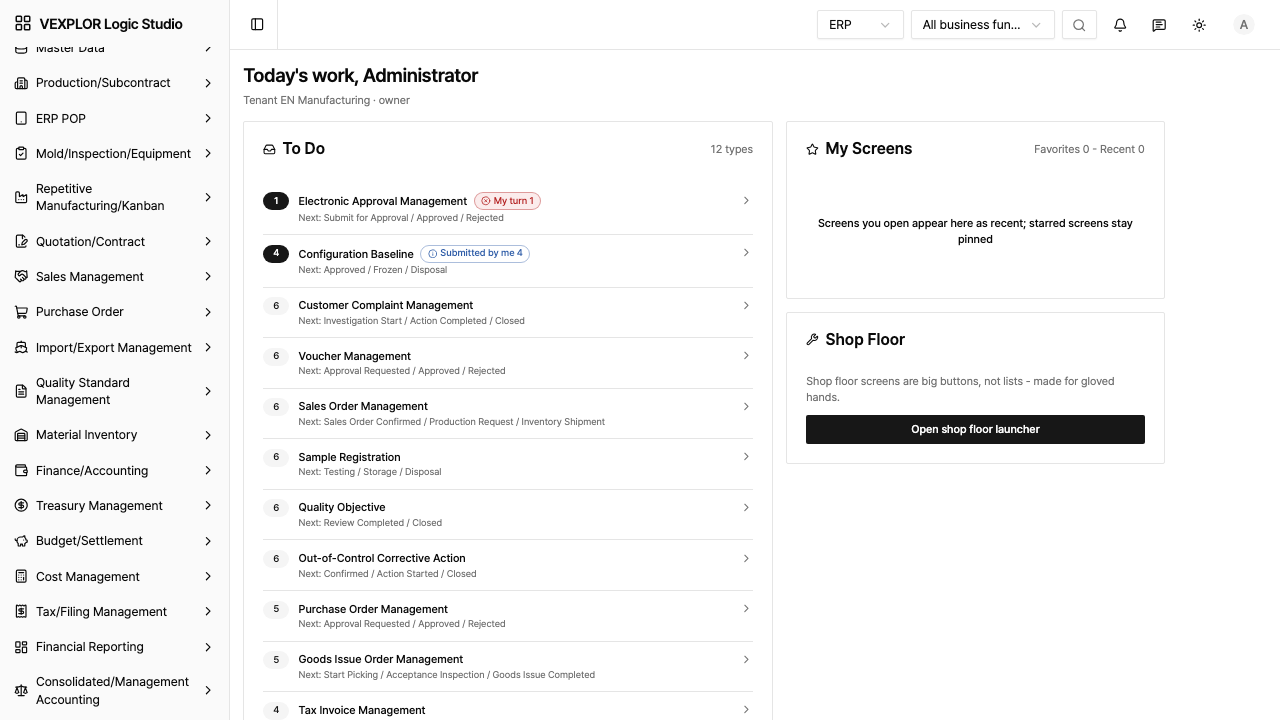
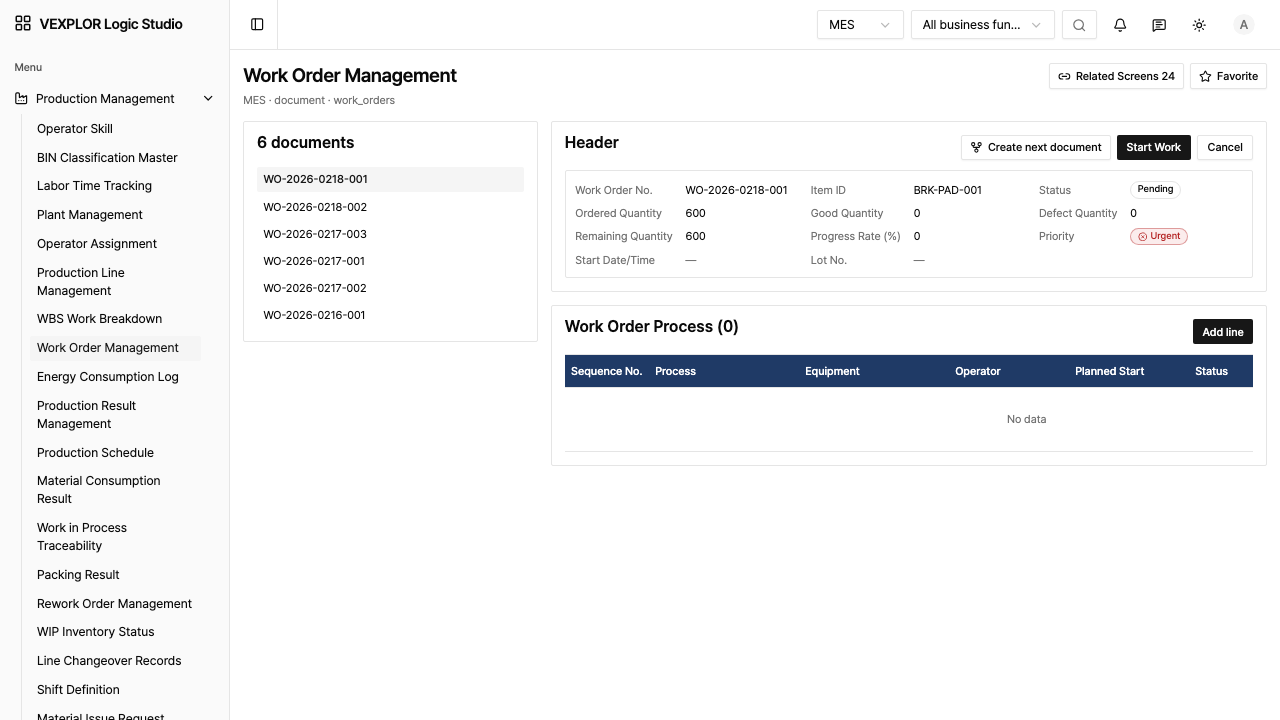
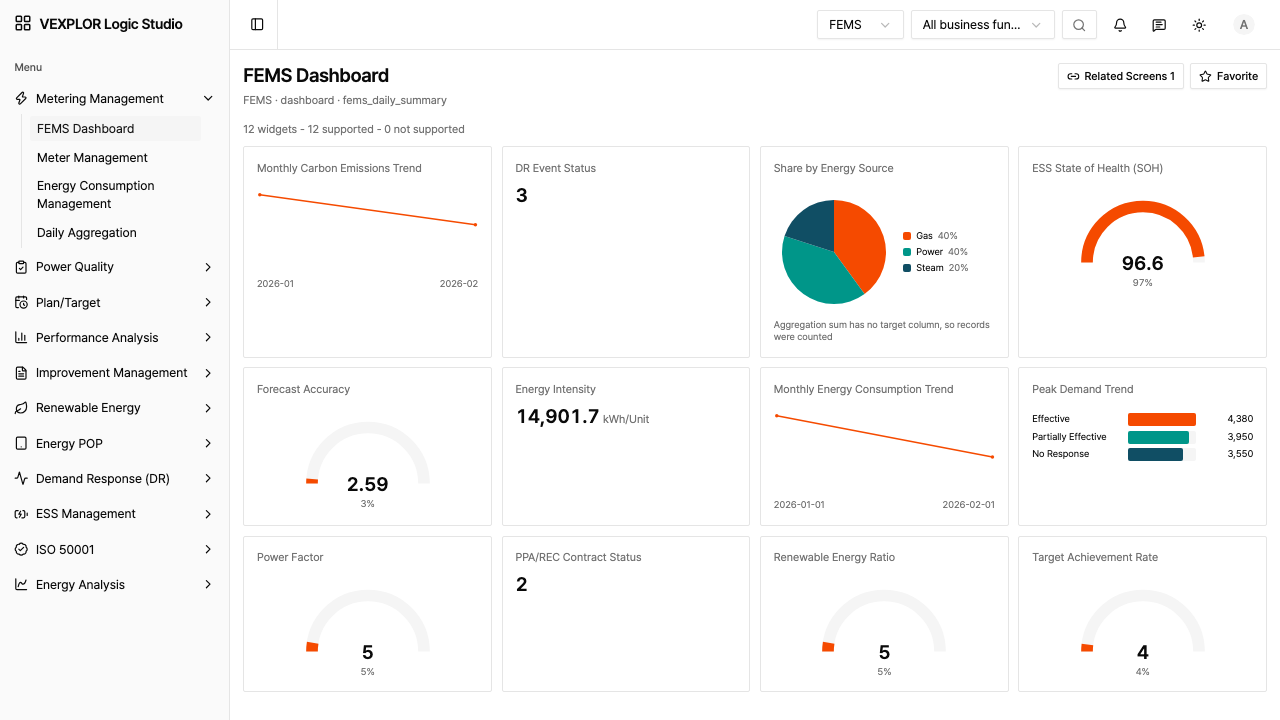
Preview VEXPLOR Logic Studio in real product screens
These screens were captured from the running service. Companies and items shown are sample data.
VEXPLOR Logic Studio calculates the carbon per product unit from production results and energy use
When a customer asks for product carbon data, the figure per unit comes from the production results and energy readings you already record. The inputs and the emission-factor version used are kept, so the same value can be reproduced months later. Results are supporting data and do not replace third-party verification.
From meter to product
Meter usage is split across equipment by allocation ratio, then across products by each machine's good output that month, giving kgCO2e per unit. Anything that cannot be allocated is shown separately.
Versioned emission factors
WACE checks published electricity factors and issues them as signed versions. Factors for product footprint and disclosure are kept apart from those for emissions trading.
Supplier carbon data
Request carbon data from material suppliers, approve the values with their evidence, and they flow into the materials stage. Suppliers who reply pay nothing.
No metering integration needed
Plants without metering integration enter bill or meter readings each month. Each value shows how it was entered (manual or estimated).
Carbon calculation and supplier carbon data are add-on modules, separate from the ESG domain. They open the product carbon and supplier carbon screens, not the full ESG domain. You can try them in a trial workspace.
Your data is separated from other companies by the database itself
Many companies use the same service, but isolation is enforced by database rules, not by application code.
Row-level isolation
PostgreSQL row-level security is forced on every business table, so rows from other companies never appear in query results.
Four roles
Owner, admin, user and viewer — delete and edit rights are split by role and enforced by the server.
Cancel, and we delete with a record
We keep your data for 30 days after cancellation so you can request a full export. After the export or the 30 days, we delete it within 5 days and give you a deletion record.
Runs on Microsoft Azure, Korea Central
The service, its database and attachments run in the Microsoft Azure Korea Central region. Your data and its backups are stored in that region.
Request a guided trial and we start together in three steps
Request
Tell us which systems you use today and the one task you want to see first.
Trial workspace and sample data
We set up a trial workspace for your company and load a sample of your data.
Review the results together
We go through the screens and search results on your data together, and you decide whether to continue.
Questions we often hear before adoption
How is it priced?
How is it different from on-premises VEXPLOR?
Do we have to replace our current MES or ERP?
How do we check whether an answer is wrong?
Does it connect to QuickBooks or Xero?
What happens to our data if we cancel?
Request a guided trial
Our team will get back to you on business days.